




Logo
Start Free Trial

Custom Reports the data your organization generates, turned into decisions that actually happen.

Custom Reports the data your organization generates, turned into decisions that actually happen.

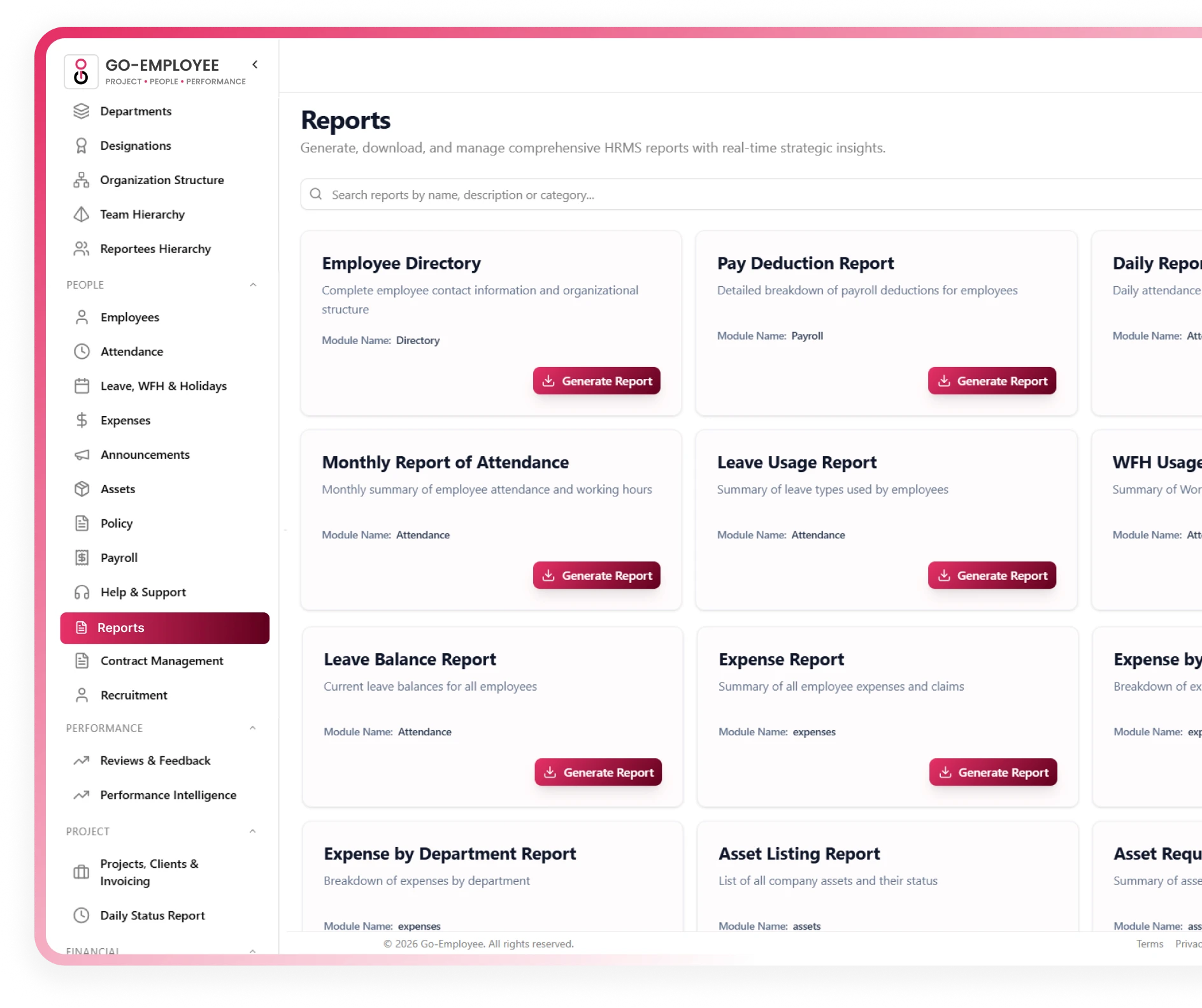
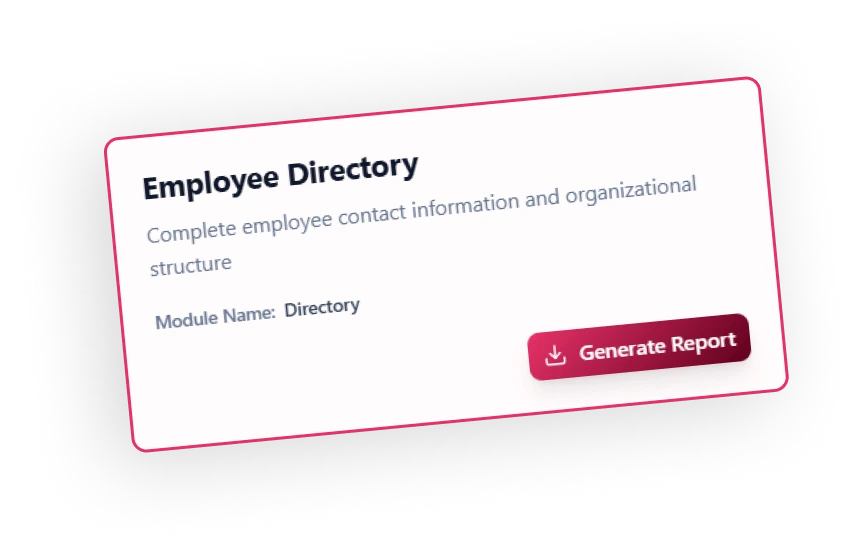
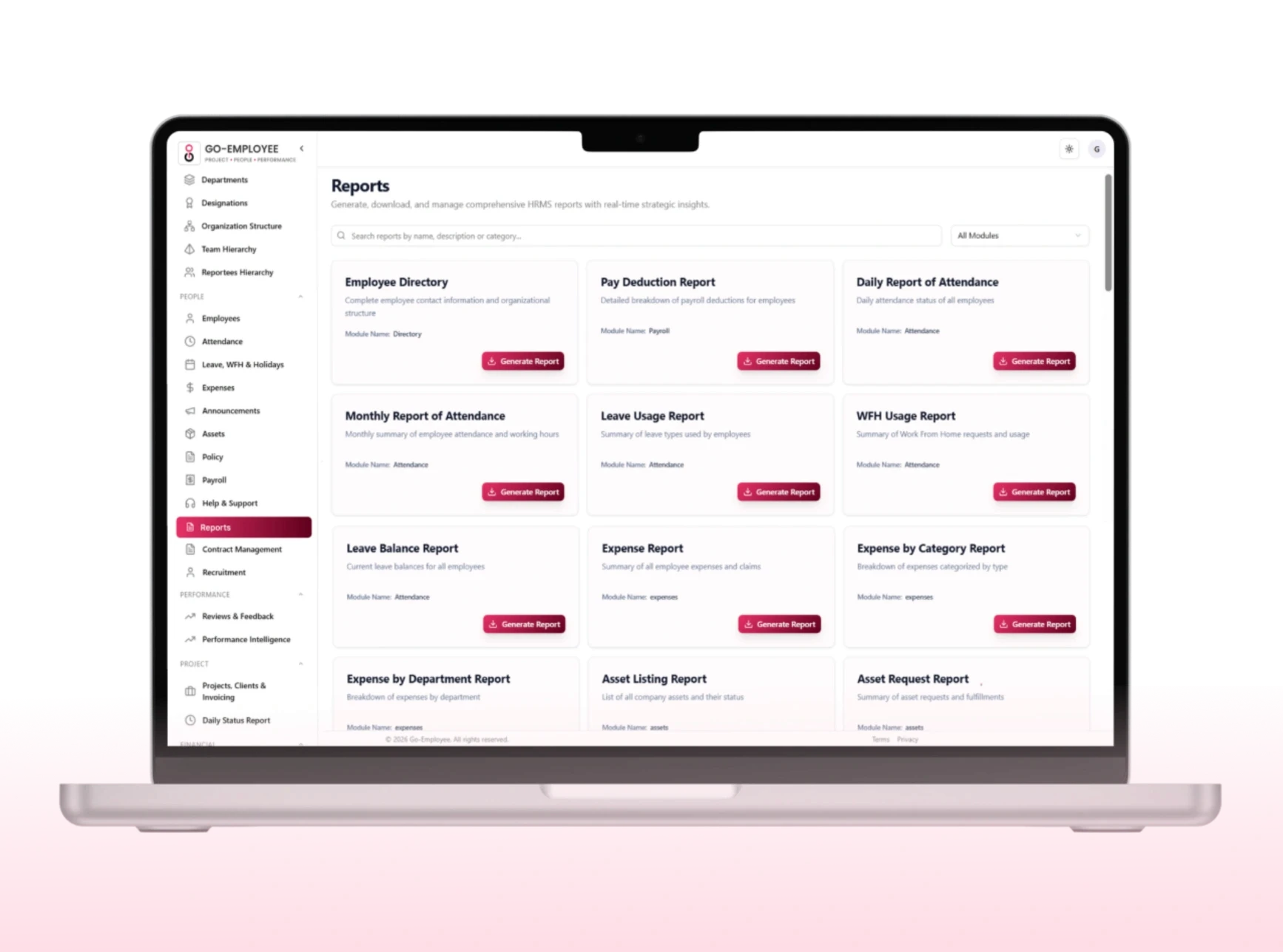
Every module in Go-EMP generates data. Custom Reports is where that data becomes intelligence. Build reports your way, filter to exactly what matters, and generate live insights from attendance, payroll, recruitment, performance, projects, and more in minutes, not days.

Company-wide emails that go unread, chat messages buried in threads,

notice boards nobody checks organizations lose critical information every day through the wrong channels. Go-EMP gives HR and leadership a dedicated communication platform where every announcement is delivered, tracked, and provably seen.

Recruitment Management
Job post
candidates details
Arrow

Trusted by growing teams to manage Projects, People and Performance

Trusted by growing teams to manage Projects, People and Performance

  • GoTrust Logo
  • Tsaaro Logo
  • Appvin Logo
  • DPO Club logo
  • Sidebar Logo
  • GoTrust Logo
  • Tsaaro Logo
  • Appvin Logo
  • DPO Club logo
  • Sidebar Logo

Every data point your organization generates available, filterable, and exportable on demand.

Every data point your organization generates available, filterable, and exportable on demand.

No more waiting for IT to pull a report. No more maintaining parallel spreadsheets. No more decisions made on stale data. Go-EMP puts the reporting power where the decisions happen.
organization-wide announcemen
Go Employee Centralized Asset Repository
Specified Annuncements

Find exactly the data that matters not everything around it.

Find exactly the data that matters not everything around it.

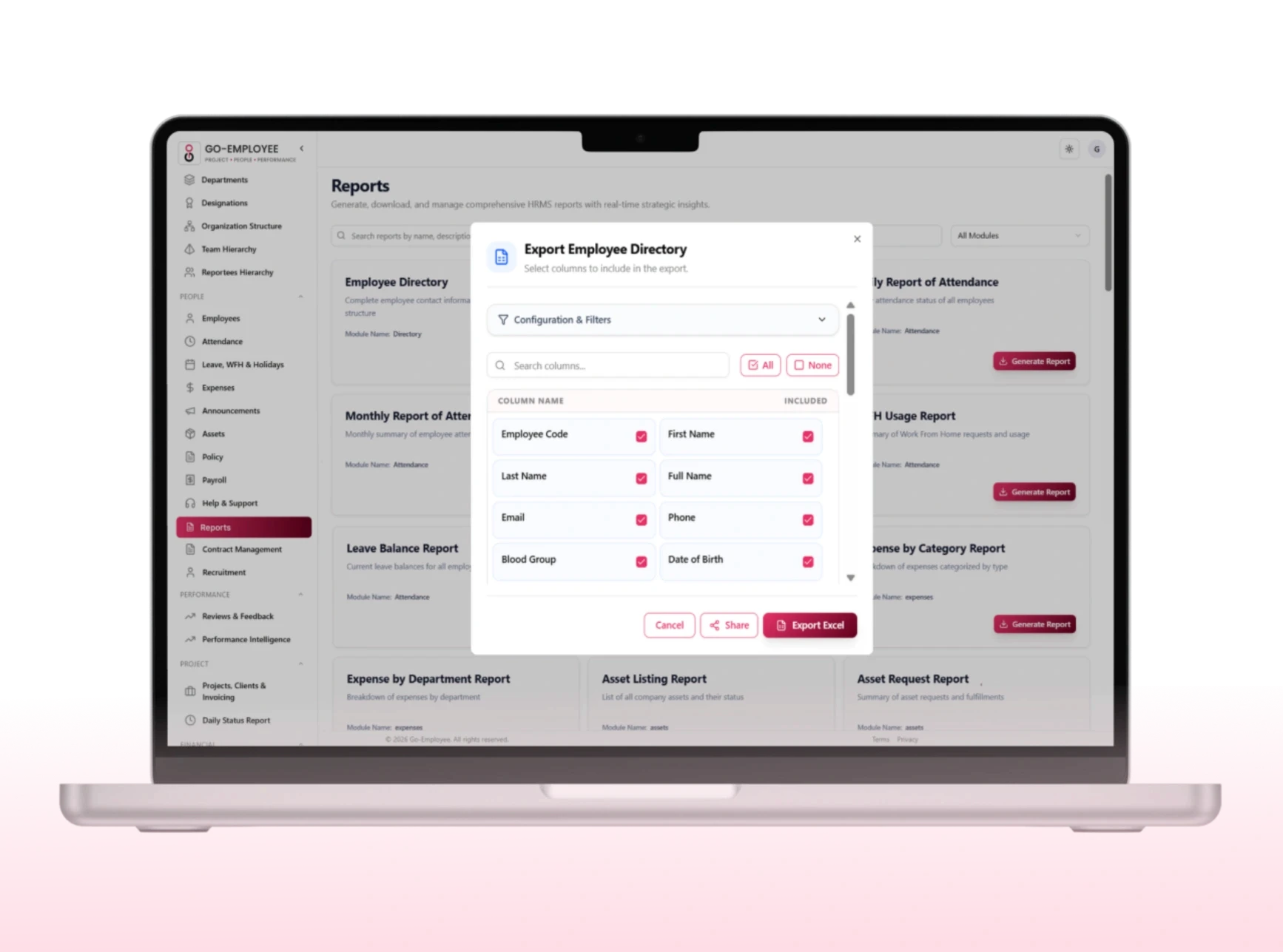
Go-EMP's advanced filtering lets you narrow any dataset to the precise subset you need instantly. No pivot tables, no manual sorting. Apply one filter or a dozen the report updates in real time.

Take your data wherever decisions are made.

Take your data wherever decisions are made.

Go-EMP reports aren't just for viewing inside the platform. Export, share, and use them wherever your team needs them from board decks to compliance audits.

Annuncement Updates

Key Features

Everything you need to build, filter, and share powerful reports.

Everything you need to build, filter, and share powerful reports.

Fully Customizable Reports

Build reports your way select only the fields that matter, arrange columns to match your workflow, and save templates for recurring use. No one-size-fits-all layout. No irrelevant data cluttering your view. Every report is built exactly for the question you're trying to answer.

Productivity Tracking

Fully Customizable Reports

Build reports your way select only the fields that matter, arrange columns to match your workflow, and save templates for recurring use. No one-size-fits-all layout. No irrelevant data cluttering your view. Every report is built exactly for the question you're trying to answer.

Productivity Tracking

Fully Customizable Reports

Build reports your way select only the fields that matter, arrange columns to match your workflow, and save templates for recurring use. No one-size-fits-all layout. No irrelevant data cluttering your view. Every report is built exactly for the question you're trying to answer.

Advanced Filters

Slice your data precisely. Filter by department, location, designation, employee status, employment type, date range, business unit, project, manager, shift, and cost center or combine multiple filters to get exactly the subset you need.

Performance Benchmarking

Advanced Filters

Slice your data precisely. Filter by department, location, designation, employee status, employment type, date range, business unit, project, manager, shift, and cost center or combine multiple filters to get exactly the subset you need.

Performance Benchmarking

Advanced Filters

Slice your data precisely. Filter by department, location, designation, employee status, employment type, date range, business unit, project, manager, shift, and cost center or combine multiple filters to get exactly the subset you need.

One-Click Excel Export

Download any report instantly in Excel format formatted, labelled, and ready for analysis, sharing with stakeholders, or submission for audits. No copy-pasting, no reformatting required.

Project Efficiency

One-Click Excel Export

Download any report instantly in Excel format formatted, labelled, and ready for analysis, sharing with stakeholders, or submission for audits. No copy-pasting, no reformatting required.

Project Efficiency

One-Click Excel Export

Download any report instantly in Excel format formatted, labelled, and ready for analysis, sharing with stakeholders, or submission for audits. No copy-pasting, no reformatting required.

Real-Time Data

Every report pulls directly from live HRMS data. What you see is current attendance logged this morning, payroll processed yesterday, leaves approved an hour ago. No stale spreadsheets, no refresh delays.

Workforce Utilisation

Real-Time Data

Every report pulls directly from live HRMS data. What you see is current attendance logged this morning, payroll processed yesterday, leaves approved an hour ago. No stale spreadsheets, no refresh delays.

Workforce Utilisation

Real-Time Data

Every report pulls directly from live HRMS data. What you see is current attendance logged this morning, payroll processed yesterday, leaves approved an hour ago. No stale spreadsheets, no refresh delays.

Role-Based Access Control

Users only see what they're authorized to see. A department manager sees their team's data. Finance sees payroll. HR sees everything configured for them. Data governance is built in not an afterthought.

Role-Based Access Control

Users only see what they're authorized to see. A department manager sees their team's data. Finance sees payroll. HR sees everything configured for them. Data governance is built in not an afterthought.

Role-Based Access Control

Users only see what they're authorized to see. A department manager sees their team's data. Finance sees payroll. HR sees everything configured for them. Data governance is built in not an afterthought.

Cross-Module Reporting

Pull data from multiple modules in a single report. Combine attendance and payroll to analyze deductions. Merge leave and performance data to find productivity patterns. One platform, one report, complete picture.

Actionable Reporting

Cross-Module Reporting

Pull data from multiple modules in a single report. Combine attendance and payroll to analyze deductions. Merge leave and performance data to find productivity patterns. One platform, one report, complete picture.

Actionable Reporting

Cross-Module Reporting

Pull data from multiple modules in a single report. Combine attendance and payroll to analyze deductions. Merge leave and performance data to find productivity patterns. One platform, one report, complete picture.

How it works

How it works

Create any report in four steps no IT, no waiting, no spreadsheets.

Create any report in four steps no IT, no waiting, no spreadsheets.

Go-EMP's report builder is designed for HR, finance, and operations teams to use independently. Select, filter, generate, and export all from one screen.

Go-EMP's report builder is designed for HR, finance, and operations teams to use independently. Select, filter, generate, and export all from one screen.

Select Module

Pick the area of the business you want to report on

Select Module

Pick the area of the business you want to report on

Choose fields

Select only the columns that matter to your report

Choose fields

Select only the columns that matter to your report

Apply Filters

Narrow the dataset to exactly the segment you need

Apply Filters

Narrow the dataset to exactly the segment you need

Generate & Export

View live results instantly or download to Excel in one click

Generate & Export

View live results instantly or download to Excel in one click

#Built for every team

#Built for every team

Built for every stakeholder in your policy process.

Built for every stakeholder in your policy process.

Track workforce trends, attendance patterns, leave utilization, onboarding progress, and performance outcomes with the exact filters and fields that make HR conversations data-driven instead of opinion-driven.

Human Resources

Analyse payroll costs, compensation structures, reimbursements, overtime expenses, and budget allocation with the granularity finance teams need to close books accurately and plan confidently.

Finance & Payroll

Monitor productivity, project progress, resource utilization, timesheet compliance, and operational efficiency through meaningful metrics so decisions about workloads, staffing, and performance are grounded in fact.

Operations & Management

Access high-level business insights that support workforce planning, strategic initiatives, and growth decisions — without needing to request a custom data pull from HR or IT. The data is there when you need it.

Leadership Teams

Asset valuation visibility

Cost tracking

Depreciation support

Audit-ready records

Finance Team

Customer Self-Onboarding

A smooth 3-step process to get your free trial.

Web Icon

Go to website

Click the “Start Free Trial” button on our website to begin.

Form Icon

Registration

Fill in all the required information and complete your registration.

Congratulation Icon

Congratulations

Your account is now ready, and you’ve successfully completed onboarding.

Scribble Background Image

See How Go-Employee Simplifies
HR, Payroll & Performance

See How Go-Employee Simplifies HR, Payroll & Performance

See How Go-Employee Simplifies HR, Payroll & Performance

Talk to our team to understand how Go-Employee can streamline workforce operations for your organization

Talk to our team to understand how Go-Employee can streamline workforce operations for your organization

Go Employee Logo

Frequently Asked Questions

Frequently Asked Questions

Answers to common questions about setup,

pricing, and how everything works.

You can link banks, tools, and spreadsheets directly from the setup page with secure one click integrations.

Can HR send an announcement to just one department instead of the whole company?

Yes. Announcements can be targeted by department, location, business unit, role, or custom employee groups, so an IT notice doesn't reach teams it isn't relevant to.

Do employees see announcements immediately, or do they have to check an intranet?

You can link banks, tools, and spreadsheets directly from the setup page with secure one click integrations.

Can announcements be scheduled in advance?

You can link banks, tools, and spreadsheets directly from the setup page with secure one click integrations.

Do we need design skills to format an announcement?

You can link banks, tools, and spreadsheets directly from the setup page with secure one click integrations.
Trusted by Founders

Trusted by Founders

Success stories from teams who transformed their work